What the heck is DNS over HTTPS and why does everyone keep arguing…
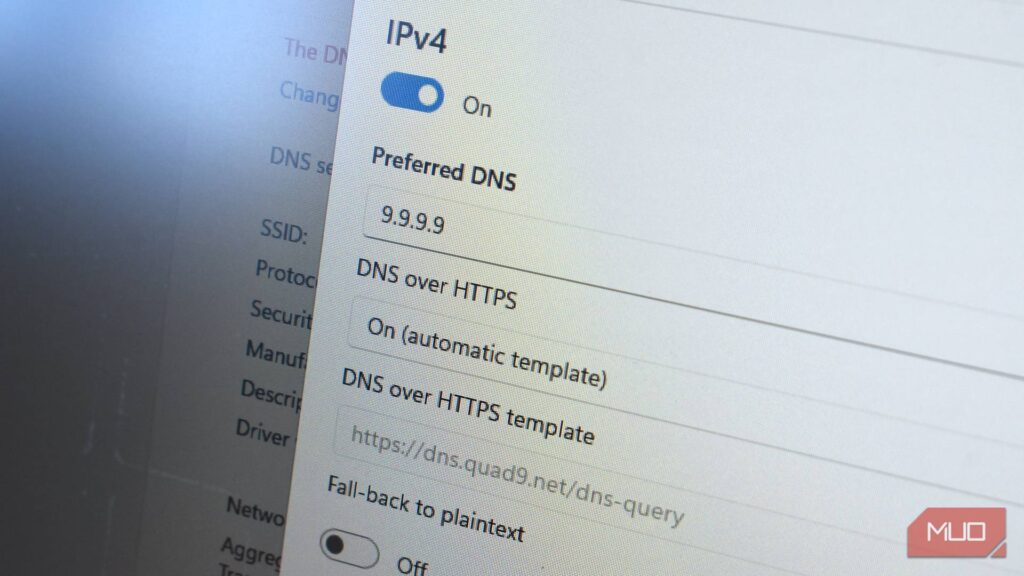
What the Heck Is DNS over HTTPS and Why Does Everyone Keep Arguing About It?
SEO Title:
“DNS over HTTPS Explained: Privacy, Security, and Why It Matters in 2025”
Meta Description:
“DNS over HTTPS (DoH) encrypts your internet queries for better privacy. Learn how it works, its benefits, and how to enable it on Windows, macOS, and Linux.”
Introduction
The internet is full of technical jargon, but few concepts are as important yet misunderstood as DNS over HTTPS (DoH). This encryption method secures your web browsing by hiding your DNS requests from prying eyes. While many modern browsers and operating systems support it, not everyone is on board. Why? Because DoH comes with trade-offs—some argue it enhances privacy, while others claim it centralizes control.
In this guide, we’ll break down what DNS over HTTPS is, its benefits, and how to enable it. We’ll also compare it to alternatives and discuss why it’s worth considering for both personal and business use.
What Is DNS over HTTPS (DoH)?
Before diving into DoH, let’s understand DNS (Domain Name System)—the internet’s phonebook. When you type a URL (like google.com), your device sends a DNS request to translate it into an IP address. Traditionally, these requests are unencrypted, meaning ISPs, hackers, or even public Wi-Fi admins can see which sites you visit.
DNS over HTTPS encrypts these requests, ensuring privacy and security. It uses the same encryption as HTTPS, making it nearly impossible for third parties to intercept or manipulate your queries.
Key Benefits of DNS over HTTPS
| Pros | Cons |
|---|---|
| Privacy Protection – Hides your browsing history from ISPs and network admins. | Centralization Risks – Many users rely on a few big providers (Cloudflare, Google). |
| Security Improvements – Prevents DNS hijacking and phishing attacks. | Bypasses Filters – Can disable parental controls or corporate firewalls. |
| Automatic Setup – Most modern browsers enable it by default. | Troubleshooting Issues – Encrypted DNS makes network diagnostics harder. |
| Censorship Resistance – Harder for governments or ISPs to block websites. | Performance Overhead – Encryption adds slight delays. |
| User Control – Lets you choose privacy-focused DNS providers. | Trust Shift – You’re trusting a third-party DNS provider instead of your ISP. |
Why Isn’t Everyone Using DNS over HTTPS?
Despite its benefits, DoH adoption isn’t universal. Some users disable it because:
- They don’t know it exists.
- They rely on network-level filters (e.g., parental controls).
- They prefer traditional DNS for troubleshooting.
However, for most users, enabling DoH is a simple way to enhance privacy without sacrificing performance.
How to Enable DNS over HTTPS
1. Browser-Level Setup (Chrome, Firefox, Edge, etc.)
Most browsers support DoH under different names:
- Chrome/Edge: Secure DNS
- Firefox: DNS over HTTPS
Steps to Enable:
- Open Settings in your browser.
- Search for “DNS” in the settings menu.
- Toggle Secure DNS or DNS over HTTPS.
- Choose a trusted provider (e.g., Cloudflare, Quad9).
2. System-Wide Setup (Windows, macOS, Linux)
For full-system protection, configure DoH at the OS level.
Windows 11:
- Press Win + X → Network Connections → Advanced Network Settings.
- Select your network adapter → Edit → IPv4/IPv6 Properties.
- Enter DNS server addresses (e.g., Cloudflare:
1.1.1.1or Quad9:9.9.9.9).
macOS:
- Go to System Preferences → Network → Advanced → DNS.
- Click + to add a new DNS server (e.g.,
1.1.1.1).
Linux:
Methods vary by distro, but you can use:
- NetworkManager GUI (GNOME/KDE)
- Terminal commands (e.g.,
resolvectlfor systemd-resolved)
DNS over HTTPS vs. Alternatives
| Feature | DNS over HTTPS (DoH) | DNS over TLS (DoT) | Traditional DNS |
|---|---|---|---|
| Encryption | Yes (HTTPS) | Yes (TLS) | No |
| Port Used | 443 (same as HTTPS) | 853 | 53 |
| Ease of Setup | Simple (browser/OS) | Requires manual config | Default |
| Compatibility | Widely supported | Limited support | Universal |
| Privacy | High | High | Low |
DoH vs. DoT:
- DoH is easier to implement (uses port 443, like HTTPS).
- DoT is more transparent but requires extra configuration.
Business and Financial Use Cases
For businesses, DoH offers:
- Enhanced Security – Prevents DNS-based attacks.
- Compliance – Helps meet privacy regulations (GDPR, CCPA).
- Remote Work Protection – Secures employee browsing on public networks.
Financial Institutions benefit from:
- Fraud Prevention – Stops DNS spoofing attacks.
- Regulatory Compliance – Ensures secure data handling.
Final Verdict: Should You Use DNS over HTTPS?
Yes! The privacy and security benefits outweigh the minor drawbacks. While it shifts trust from ISPs to third-party DNS providers, reputable services like Cloudflare and Quad9 prioritize user privacy.
Action Step: Enable DoH in your browser or OS today—it takes minutes and significantly improves your online security.
Key Takeaways
✅ DNS over HTTPS encrypts your web requests for privacy.
✅ Easy to enable in browsers and operating systems.
✅ Businesses benefit from security and compliance advantages.
✅ Weigh pros/cons, but the benefits generally outweigh risks.
By adopting DoH, you take a crucial step toward a more secure and private internet experience. 🚀